 |
| Asha(The Hope) of Nokia |
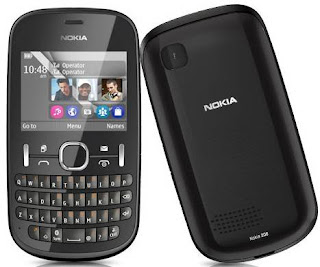
This article is about installing Whatsapp in Nokia Asha 200(dual sim) phone which runs on a Symbian S40 OS.Officially Whatsapp doesn't support Nokia Asha 200.The reason behind it they are saying is because it is a dual sim phone.Now recently Nokia launched Nokia Asha 210 which is also a dual sim mobile phone,but it has whatsapp application pre-installed in it.So Nokia fans all over the world are waiting for an official update from Nokia where whatsapp can be installed.But nobody knows if when it will happen.So let me try to help you with this.
The process i'm going to explain here is not invented by me.It was in the internet in two different places and i just combined both ideas together and it worked!!!..So the credit goes to original geeks who got the idea how to do it.
This process might look long but it actually takes hardly 10 to 15 minutes.Now before we start the process i have to tell you some important things to you.
- Vodafone in Portugal,VIVO in Brazil is not supporting whatsapp.So even if you try the below methods,it may not be possible to use whatsapp if you are from any of those country using any of those mentioned websites.
- Before starting the process it will be better if you have a data pack activated.Even if it is a 25MB pack,it is fine.
- It works with your Primary sim or Sim 1,and you will be using sim 1 for internet.So if you have an internet pack already activated in second sim,switch the sims and put it into the main slot.
- Read the whole article first and then decide if you want to install or not.
- 'New message' notifications in the whatsapp may not work in our own Nokia Asha 200.So you have to open the app every time to check if you have any new messages.
- I'm not a mobile phone expert so if you ask me about other phones,i won't know.I have a Nokia Asha 200.So from last one month i'm trying to install whatsapp in my mobile and just found a working idea now.And i'm just sharing it.
- Usually if you download whatsapp (meaning if it's not pre-installed in your phone by the phone company),you can use the app for free for one year and you have to pay $0.99(55Rs) for the next year.Or it will expire in one year.
- If you install it now,if NOKIA ever come up with a official update i don't know if we will be able to start a new account on the same number.
- It is better to have a memory card on your phone,since Nokia Asha 200 has very less internal memory.
- You should have Nokia PC suite and Win.rar(download it here) or 7zip(download it here) installed on your Computer.
- Your contacts must be saved in the phone memory(not in sim memory).

1. First step is posted in
Whatsapp website itself in their FAQ section.It is specifically for Indian customers or users.
WhatsApp on Nokia S40 phones has difficulty with certain mobile providers in India, including Airtel, Idea, Vodafone, Tata Docomo. For more information, see our website.
If you have Airtel or Tata Docomo as your mobile provider, we have confirmed reports of successfully using WhatsApp with a specific wireless access point configuration:
Go to Settings > Configuration > [Preferred Access Point] > Select Mobile Office.Go to Settings > Configuration > [Default config. settings] > Delete the configuration settings.Reboot your phone.
If you have Vodafone as your mobile provider, these steps may help:
Go to Settings > Configuration > [Preferred Access Point] > Select Vodafone Mobile Connect.Go to Settings > Configuration > [Default config. settings] > Delete the configuration settings.Reboot your phone.
If you have Idea as your mobile provider, you may be able to successfully use WhatsApp by following these steps:
Go to Settings > Configuration > [Default Config Settings] > Select Idea InternetGo back to Configuration and then to [Preferred access point] > Select Idea InternetRestart your phone.
Even though you may be able to send and receive emails and chats from other applications, one or more of the channels that WhatsApp uses may be selectively blocked by your mobile provider's wireless access point settings. If this is the case, we recommend you to contact your mobile provider.
Now let me simplify that for airtel users...
1.Go to Menu->Settings->Configuration->Activate Configurations->Airtel->Web->Select Mobile Office.
2.Menu->Settings->Configuration->Activate Configurations->Airtel->Access Point->Mobile Office.
3.Delete every other configuration settings by going to 'Delete settings'.
Delete even your sim 2's settings (if you have one).Later on you can request sim 2's GPRS settings anytime by calling to their customer care.
2. Click on
this link and download the file to your computer.
3. Extract/Unzip the files into one new single folder(You need WinRar software in your PC to do this.You can find it anywhere in internet).You will find two whatsapp files(jad&jar format) and two 'Notification' files(jad&jar format).And you better name this new folder as 'WhatsApp'
4. Windows won't recognize those files because the file extension is '_jar' and '_jad' instead of '.jad' and '.jar'.You should rename the files.So replace underscore ( '_' ) symbol with dot on all four files.So after renaming they should have names given below.
Notificacoes.jad
Notificacoes.jar
WhatsApp.jad
WhatsApp.jar
5. Connect your phone using a data cable.Select 'Mass Storage' in the phone screen.Keep your phone aside.
6.Copy the folder which contains four files and paste it into your phones memory card.
7.Press 'Done' on the phone screen.
8.You can disconnect the phone from the PC now.(You don't have to select any other options which shows on the phone screen once you press 'Done')
9.Next steps you have to do in phone.We don't need PC for those steps.
10.Go to your phones memory card,and open the folder which just pasted.
11.Now you will find only two files there.'WhatsApp' and 'Notifications'.
12.Go to>Whatsapp(Don't open,just select it)>Options>Update Version.
13.Go to>Notifications(Don't open,just select it)>Options>Update Version.(Sometimes it might show an error message saying 'Link not found'.But don't worry,move on to the next step without updating it.)
14.After updating both apps,open 'WhatsApp'(It will take a lot of time to open it for first time,so don't panic),Select Sim 1 or your Primary Sim when it asks for the option. (Remember it only works with your main sim card,which is placed under battery.If you use the second sim for internet browsing,either switch the sim cards or start using the first sim for internet).
15.Put your Country code and phone number there.It will ask some more questions like Username and Photo.Add a Username,you can add the photo later.Then it will start installing and will check your address book.It will take time.May be upto 5 minutes.
16.Have patience and wait for it to complete the process.
17.Now enjoy..Whatsapp is installed in your own Nokia Asha 200 also!!!
Important: If you open Whatsapp before updating,it might say invalid app and will tell you to delete it.So update it!!!.If you opened it by mistake,delete the whole folder,start from Step 5 again.
That's all folks.Let me know if you have any doubts in installation process.You can post your queries and success stories of installation in comment section.But remember i got it done when i tried the fifth time.So read even the comment section and if your whatsapp is not getting installed in the first try.Keep trying again.
Please share this article link in your facebook or twitter account and it will be really big help for other Nokia Asha 200 users like you.Thank you for visiting.


